MedGemma on AWS — Deployment Guide
Subscribe to MedGemma via AWS Marketplace, deploy it to Amazon SageMaker, and run medical-image inference — all from your existing AWS account.
MedGemma is a medical vision-language model packaged by Tech42 and delivered as an AWS Marketplace SageMaker model package. This guide walks you through deploying it as a real-time endpoint or a batch transform job.
Contents
- Prerequisites
- Subscribe in AWS Marketplace
- Get the Model ARN
- Real-time inference
- Batch transform
- Delete an inference
- Unsubscribe from AWS Marketplace
- Known issues
Prerequisites
- An AWS account with permission to use AWS Marketplace, CloudFormation, and SageMaker.
- Service quota for the instance type used by the deployment:
- Real-time inference → SageMaker hosting (endpoint usage) quota.
- Batch transform → SageMaker batch transform job quota.
- The quota must exist in the AWS Region where you deploy. See Known issues if your quota is zero or insufficient.
Subscribe in AWS Marketplace
- Open the AWS Marketplace.
-
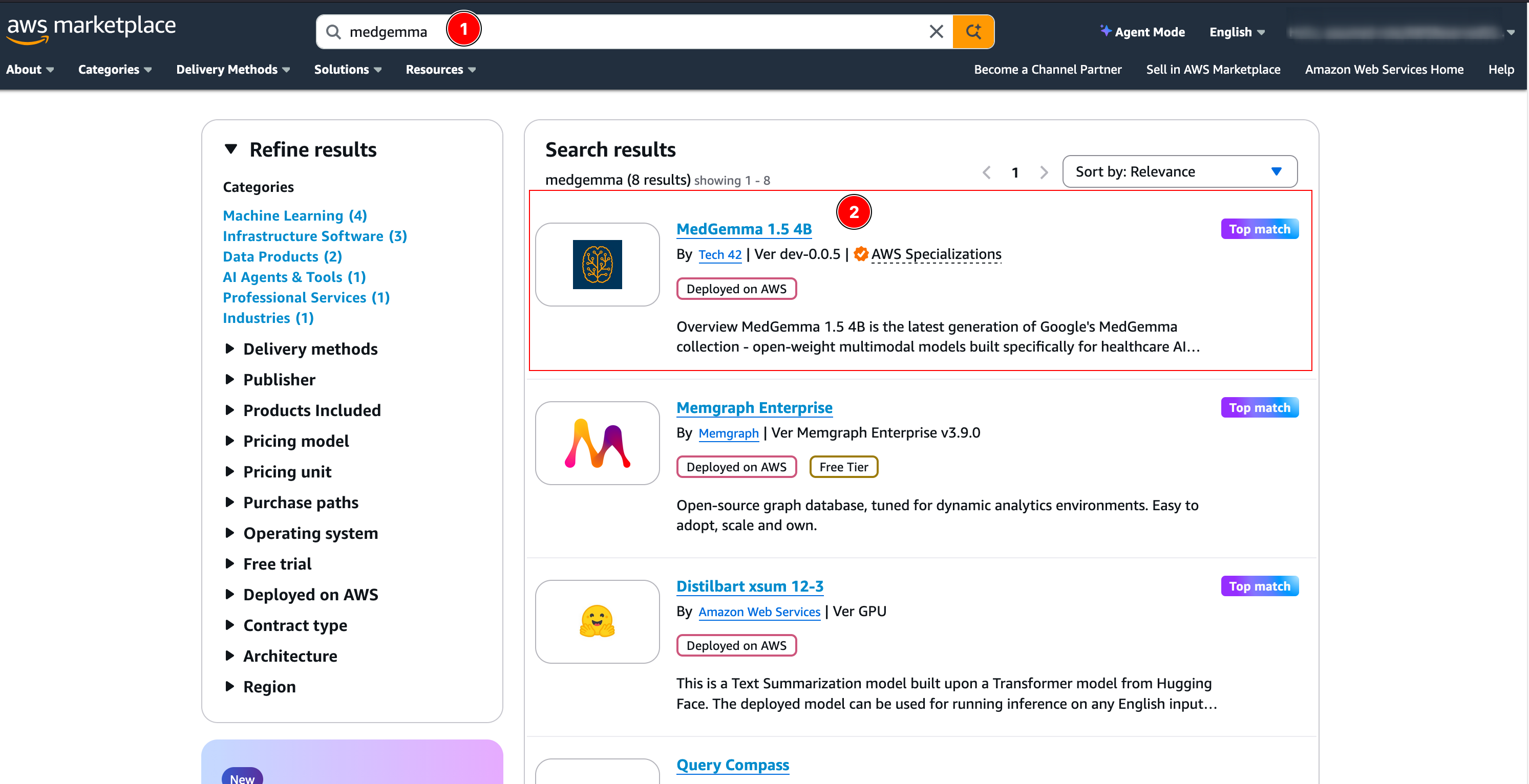
Search for “MedGemma” and select the product offered by Tech42 (top match: MedGemma 1.5 4B).
-
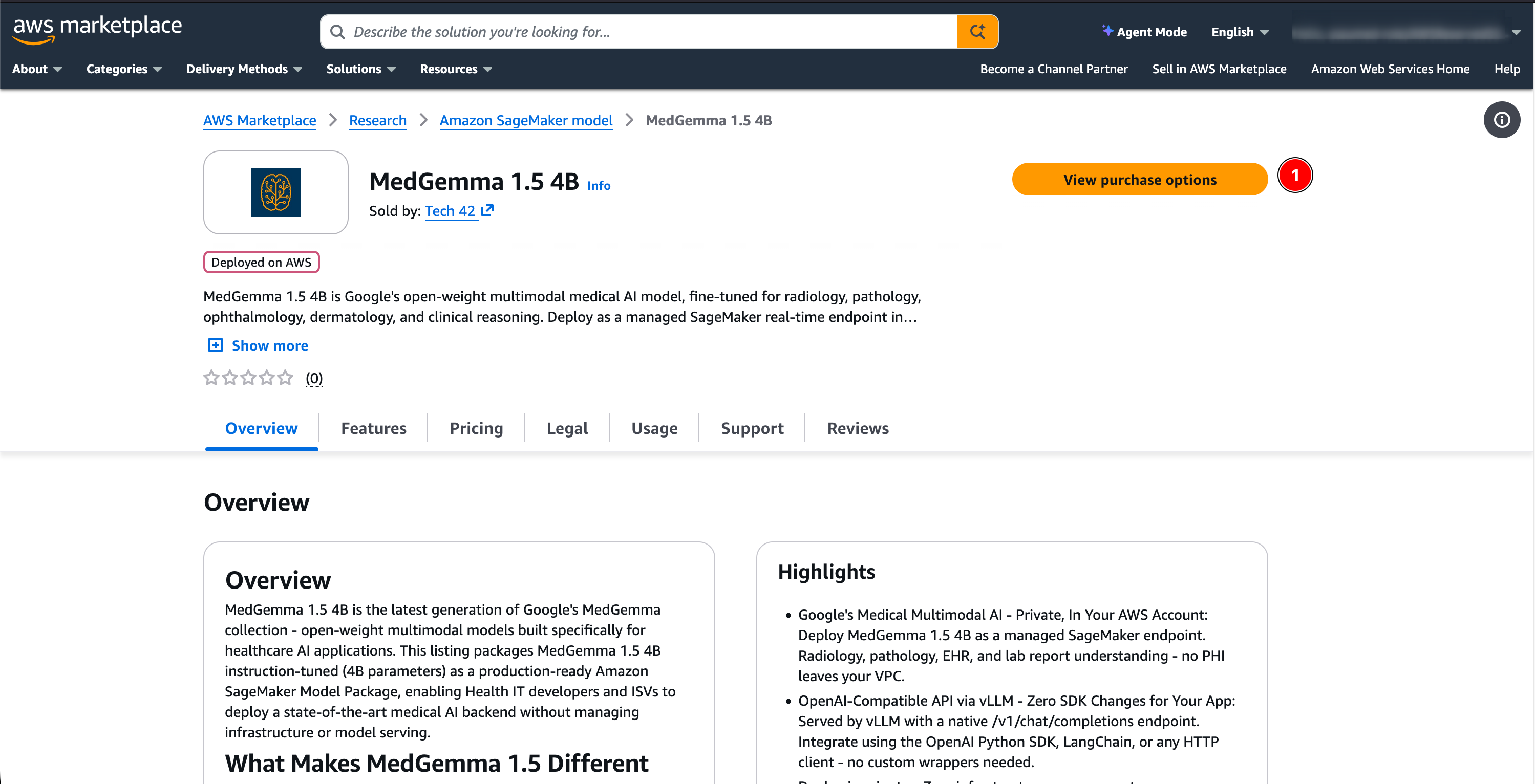
On the listing page, click View purchase options.
-
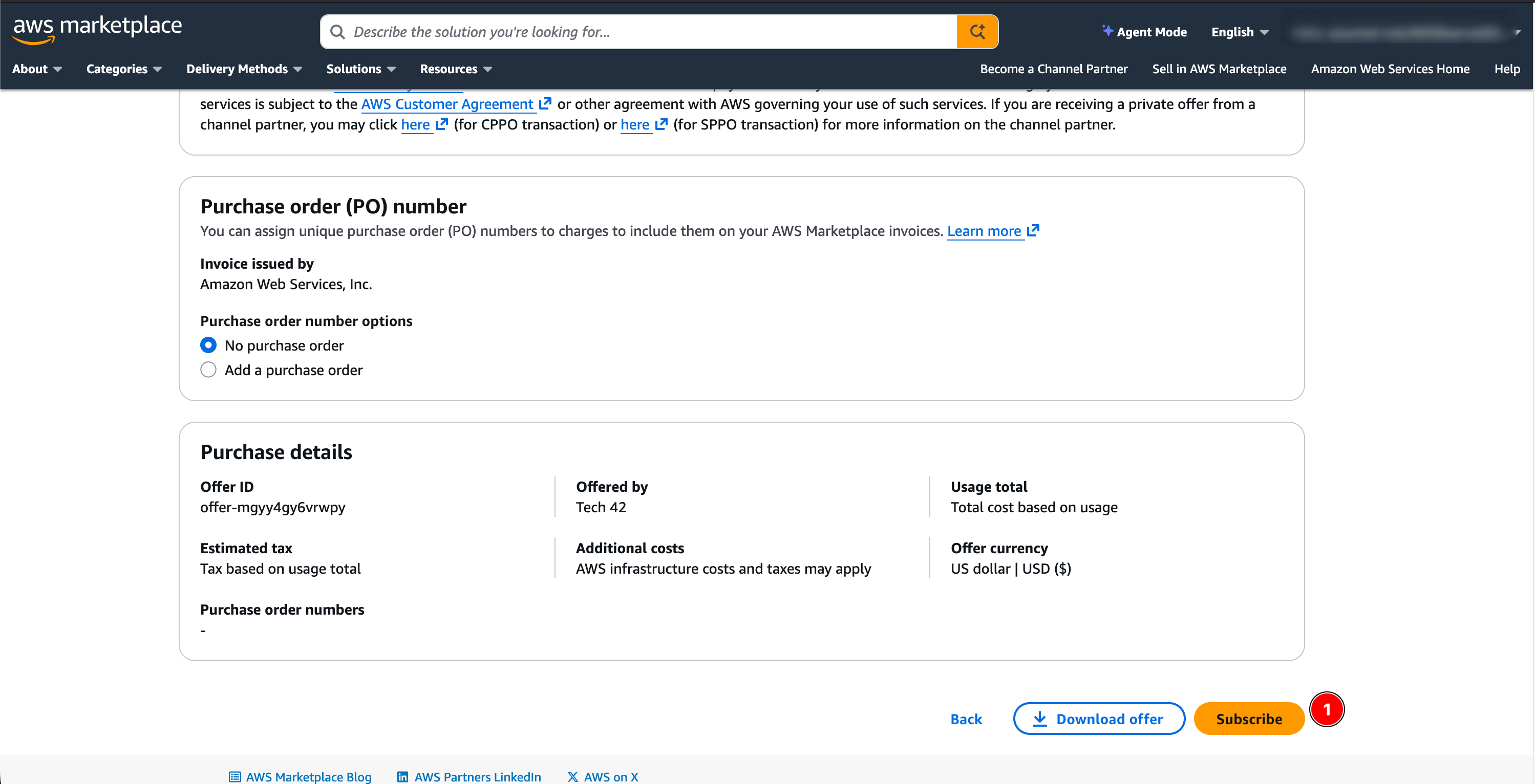
Review the EULA, pricing, and purchase details, then click Subscribe.
- Wait 1–2 minutes for the subscription to validate in your account.
Confirm the subscription:
- In the console, go to AWS Marketplace → Manage Subscriptions → Active Subscriptions.
- Filter Delivery method by “SageMaker Model”.
- Confirm MedGemma appears in your product list.
Get the Model ARN
Both deployment options need the Marketplace Model package ARN. It changes with both the Region and the product version, so copy the one that matches your target Region.
-
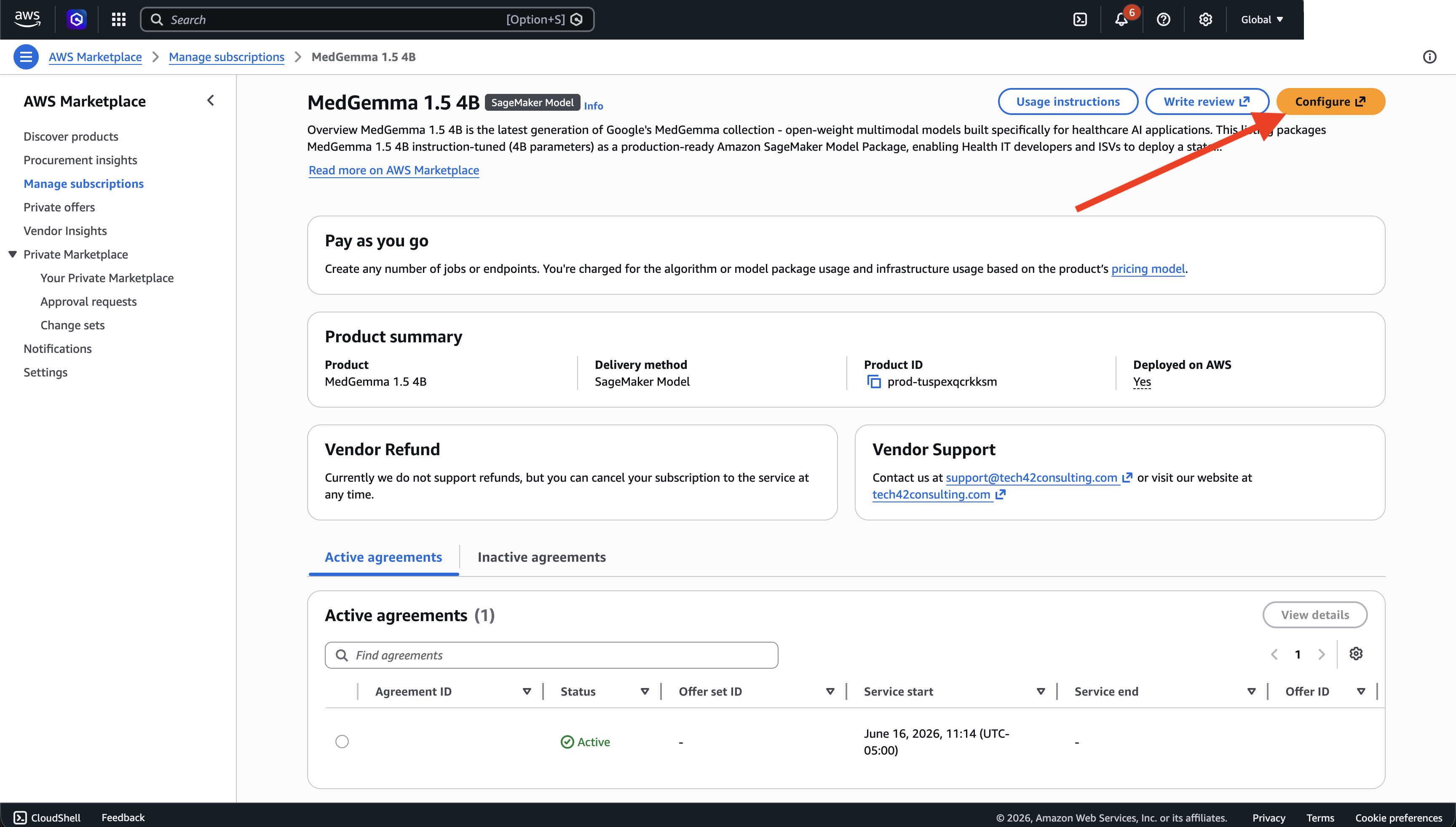
Go to AWS Marketplace → Manage Subscriptions and open your MedGemma subscription, then click Configure (top right).
-
On the Setup page, set Launch method to AWS CloudFormation, then choose the Version and the Region you will deploy in.
-
In the Model ARNs panel on the right, copy the ARN for your chosen Region — you will paste it into the stack parameters below.
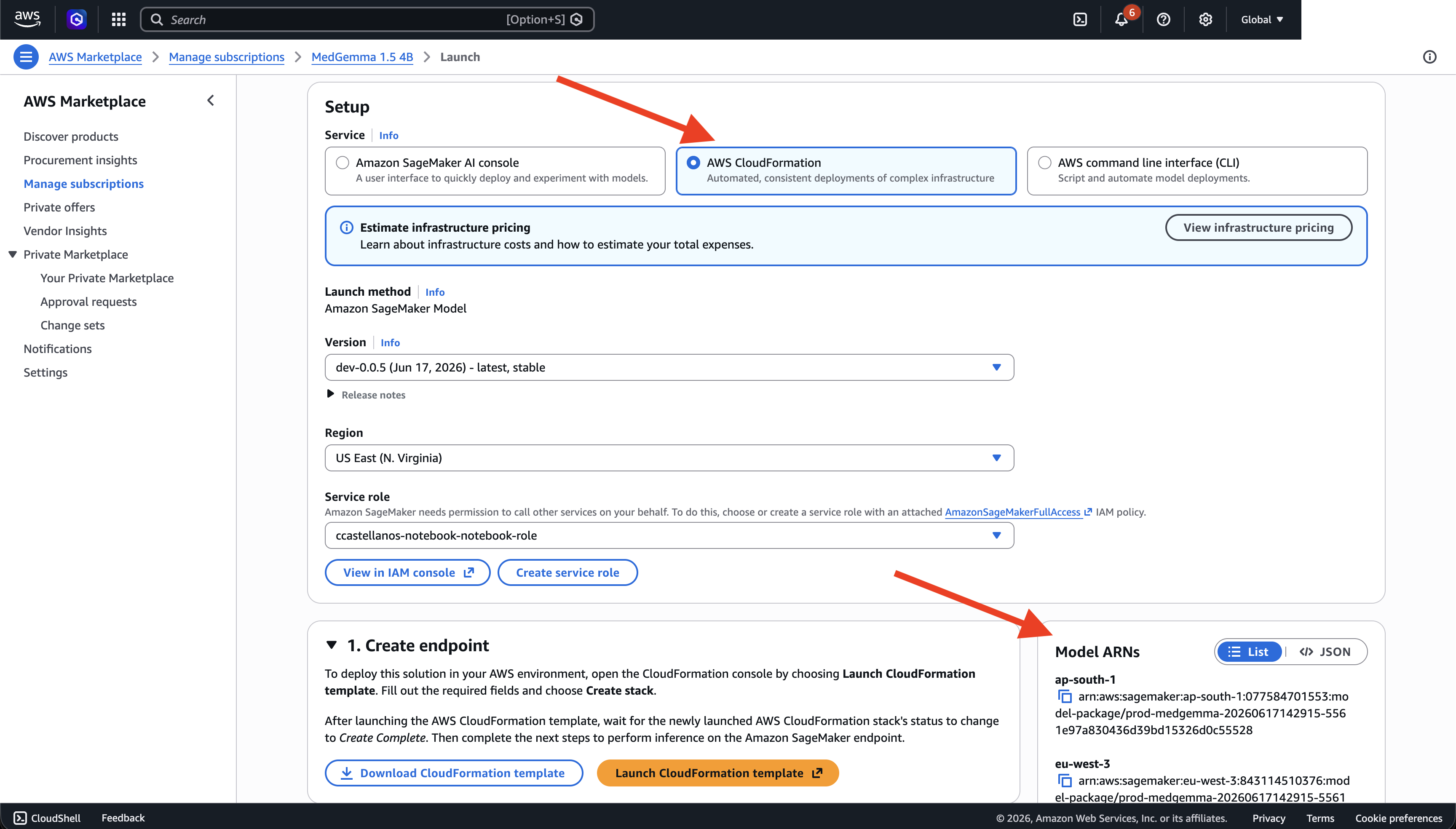
This page is only for copying the Model ARN. Do not click Launch CloudFormation template (or Download CloudFormation template) here — those use the default AWS Marketplace stack. Instead, deploy with the Tech42 CloudFormation templates under Real-time inference / Batch transform, which provision the full set of resources recommended for this implementation (autoscaling, CloudWatch dashboard, execution role, encryption/VPC options, and more).
Real-time inference
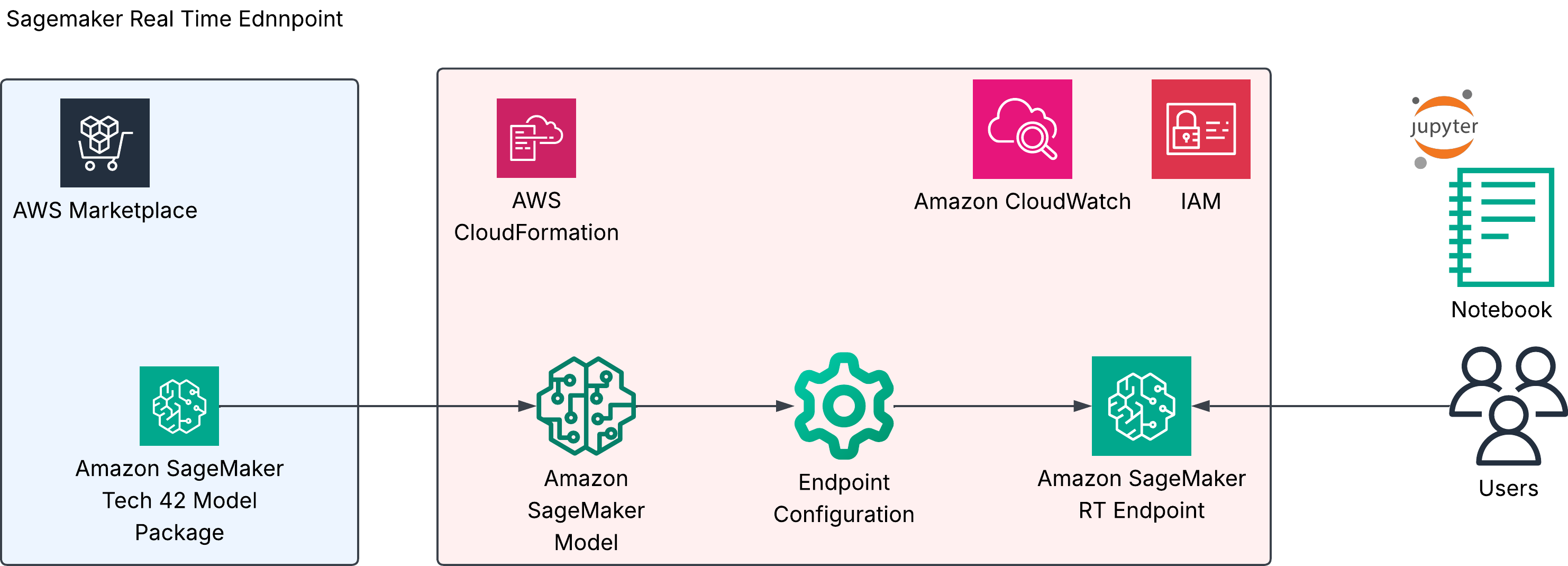
A persistent HTTPS endpoint for synchronous, low-latency inference — best for interactive or online use.
Steps
-
Launch the real-time stack (or open it from the product’s Usage instructions page):

- Set a Stack name.
- Paste the Model ARN from Get the Model ARN into Marketplace Product ARN — the only required field.
- Click Create stack and wait for
CREATE_COMPLETE.
Template in this repo: cf/template-marketplace-realtime.json — creates the SageMaker model, endpoint config, endpoint, and a CloudWatch dashboard.
Parameters
Required
- Marketplace Product ARN — the Model ARN from Get the Model ARN (your subscribed version + Region). Everything below has a sensible default.
Optional settings (defaults shown)
General
| Parameter | Default | Notes |
|---|---|---|
| Endpoint Name | medgemma-marketplace-endpoint | Name of the SageMaker endpoint. 1–63 chars; letters, numbers, hyphens. |
| Marketplace Referrer URL | — | Optional link back to the Marketplace configuration page. |
Size
| Parameter | Default | Notes |
|---|---|---|
| Instance Type | ml.g7e.2xlarge | Allowed: ml.g6.xlarge/2xlarge/4xlarge, ml.g6e.xlarge/2xlarge/4xlarge, ml.g7e.2xlarge/4xlarge. The G5 family is not supported (CUDA/driver image incompatibility). Drives cost and the quota you need. |
| Initial Instance Count | 1 | Instances launched with the endpoint (min 1). |
Scaling
| Parameter | Default | Notes |
|---|---|---|
| Enable Auto Scaling | Yes | Yes/No. Configures Application Auto Scaling on the variant. |
| Minimum Instance Count | 1 | Floor for autoscaling. |
| Maximum Instance Count | 4 | Ceiling for autoscaling. |
| Invocations Per Instance Target | 5 | Target invocations/instance that triggers scaling. |
| Scale-In Cooldown Seconds | 300 | Wait after a scale-in before the next. |
| Scale-Out Cooldown Seconds | 60 | Wait after a scale-out before the next. |
Advanced
| Parameter | Default | Notes |
|---|---|---|
| SageMaker Execution Role ARN | — | Leave blank and the stack creates a least-privilege role; set an ARN to reuse your own. |
| Production Variant Name | AllTraffic | Name of the endpoint production variant. |
| Model Data Download Timeout Seconds | 3600 | 60–3600. Max wait for model artifacts to download. |
| Container Startup Health Check Timeout Seconds | 1800 | 60–3600. Max wait for the container to pass health checks. |
Security & Encryption
| Parameter | Default | Notes |
|---|---|---|
| KMS Key ID | — | Key ID (UUID) or ARN to encrypt endpoint config + captured data. Blank = default SSE-S3. |
| VPC Subnet IDs | — | Comma-separated subnet IDs to run the model in a VPC. Blank = no VPC. |
| VPC Security Group IDs | — | Comma-separated SG IDs. Required if VPC Subnet IDs is set. |
| Enable Network Isolation | Yes | Yes/No. Blocks outbound network from the model container. |
How to use
- Test the endpoint:
notebooks/realtime_endpoint.ipynbinvokes the endpoint with a medical image and reads the response. A sample input image is atnotebooks/inputs/chest_xray.png. - Autoscaling is on by default (
Enable Auto Scaling = Yes); tune it with the Scaling parameters above. - Quota: the endpoint needs SageMaker hosting quota for the chosen instance type in the Region — see Known issues.
Batch transform
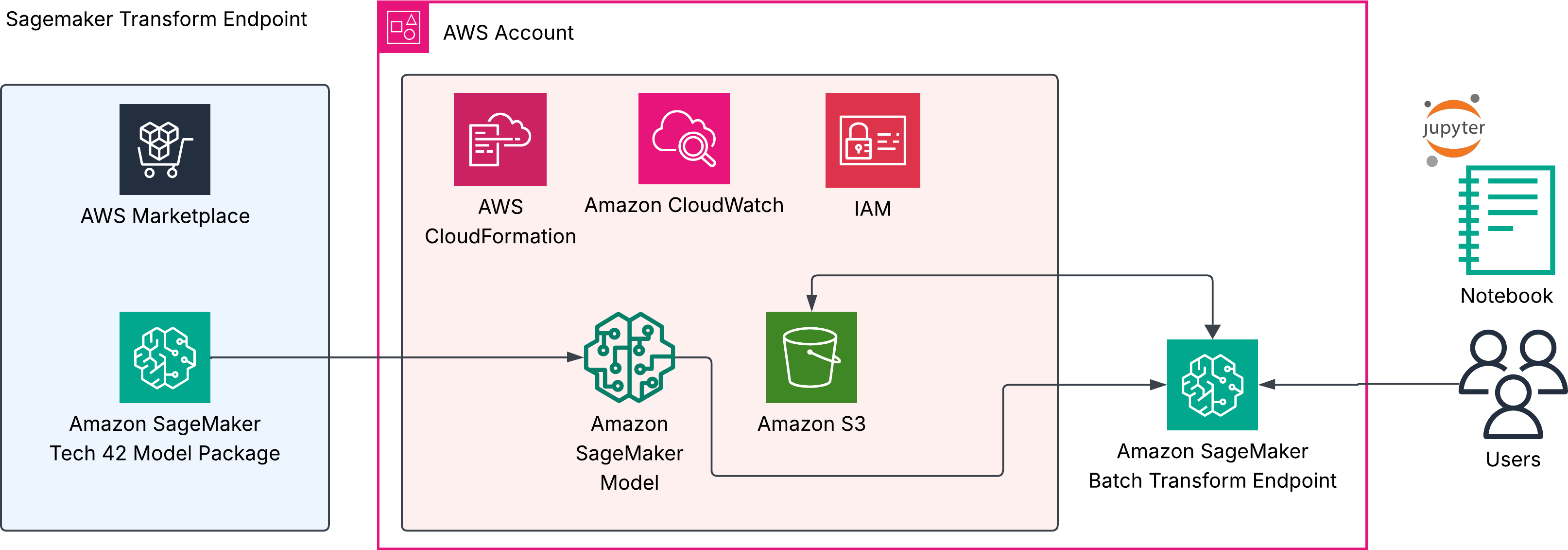
An offline job that runs the model over a dataset in S3 and writes results back to S3 — no persistent endpoint. Best for bulk/asynchronous processing.
The CloudFormation template creates the infrastructure (SageMaker model, IAM role, and S3 bucket). The actual transform job is started by the notebook.
Steps
-
Launch the batch stack:
- Set a Stack name.
- Fill the required parameter (see Parameters).
- Click Create stack and wait for
CREATE_COMPLETE. - Open
notebooks/batch_transform.ipynb, fill the CloudFormation outputs (ModelName,ExecutionRoleArn,BatchDataBucketName), and run the cells. The notebook uploads a JSONL batch, starts the transform job, waits for completion, and reads the output.
Template in this repo: cf/template-marketplace-batch-transform.json
Parameters
Required
| Parameter | Value to set |
|---|---|
| Marketplace Product ARN | The Model ARN from Get the Model ARN (your subscribed version + Region). |
Optional settings (defaults shown)
| Parameter | Default | Notes |
|---|---|---|
| Input S3 Prefix | input/ | Prefix in the managed bucket where the notebook will upload batch input. |
| Output S3 Prefix | output/ | Prefix in the managed bucket where transform output will be written. |
| SageMaker Execution Role ARN | (created by stack) | Optional. Leave blank to let the stack create a role with the required S3 and CloudWatch permissions. |
| Marketplace Referrer URL | — | Optional link back to the Marketplace configuration page. |
How to use
- Run a job:
notebooks/batch_transform.ipynbuploads a JSONL batch request, launches the transform job, and reads the output. A sample input image is atnotebooks/inputs/chest_xray.png. - Instance families: the G5 family is not supported (CUDA/driver image incompatibility) — pick a newer supported GPU family in the notebook. See Known issues.
- Quota: the job needs SageMaker batch transform quota for the chosen instance type in the Region.
Delete an inference
Deleting the inference resources is the only way to stop SageMaker hosting / batch charges for MedGemma. Charges keep accruing while a real-time endpoint is
InServiceor a batch transform job isInProgress. Canceling the Marketplace subscription alone does not stop these charges — see Unsubscribe.
Option A — Delete the CloudFormation stack (recommended)
The Tech42 stacks (real-time / batch) create the SageMaker model, endpoint config, endpoint, IAM role, S3 bucket, CloudWatch dashboard, and autoscaling policy as a single stack. Deleting the stack tears them all down together.
- Open the AWS CloudFormation console.
- Select the stack you launched for MedGemma (e.g.
medgemma-realtime). - Click Delete → Delete.
- Wait for stack status
DELETE_COMPLETE.
For a real-time stack, CloudFormation deletes the endpoint, endpoint config, model, and autoscaling target in the right order. For a batch stack, the managed S3 bucket is retained by default (so your input/output data isn’t lost) — empty and delete it manually if you no longer need it.
Option B — Delete individual SageMaker resources
Use this if you deployed the resources manually (not through CloudFormation), or if a stack delete failed and left resources behind. Deleting the endpoint does not delete its configuration or the model — delete them in this order:
- Delete the endpoint (real-time) — stops hosting charges immediately.
- Console: SageMaker → Inference → Endpoints → select → Actions → Delete.
- CLI:
aws sagemaker delete-endpoint --endpoint-name <endpoint-name>
- Stop any running batch transform job (batch).
- Console: SageMaker → Batch transform jobs → select → Stop.
- CLI:
aws sagemaker stop-transform-job --transform-job-name <job-name>
- Delete the endpoint configuration.
- Console: SageMaker → Inference → Endpoint configurations → select → Actions → Delete.
- CLI:
aws sagemaker delete-endpoint-config --endpoint-config-name <config-name>
- Delete the SageMaker model.
- Console: SageMaker → Inference → Models → select → Actions → Delete.
- CLI:
aws sagemaker delete-model --model-name <model-name>
Deleting the SageMaker model only removes the model entry — it does not delete the underlying Marketplace model package, the IAM role, or any S3 artifacts.
Unsubscribe from AWS Marketplace
AWS Marketplace does support self-service cancellation of MedGemma, but only after all inference resources are gone. Canceling stops future Marketplace charges; it does not refund charges already on an invoice, and it does not stop SageMaker hosting/batch charges on running endpoints or jobs.
Before you cancel
- Delete all inference resources for this subscription — follow Delete an inference first.
- Confirm no real-time endpoints are
InServiceand no batch transform jobs are running for the MedGemma model package.
Cancel the subscription
- Open the AWS Marketplace console → Manage subscriptions.
- Open the Delivery method filter and choose SageMaker Model.
- Select your MedGemma subscription.
- Under Agreement, open the Actions menu → Cancel subscription.
- In the dialog, type
confirm, then click Yes, cancel subscription.
After cancellation you can no longer launch the MedGemma algorithm or model package in any Region. To use it again, re-subscribe from the Marketplace listing and fetch a fresh Model ARN.
When self-service cancel is unavailable
Self-service cancellation is available for usage-based (pay-as-you-go) subscriptions and for public contracts within 48 hours of purchase. For other agreement types, the seller (Tech42) must initiate the cancellation request, which you then approve from the same Manage subscriptions page. For past-charge refunds, contact Tech42 to submit a billing adjustment request — Marketplace cancellation alone does not issue refunds.
Known issues
| Symptom | Cause | Fix |
|---|---|---|
| Stack fails creating the endpoint | Quota not available — the account has 0 quota for the instance type. | Request a quota increase in Service Quotas → Amazon SageMaker for the endpoint instance type, then redeploy. |
ResourceLimitExceeded during deploy | Insufficient quota in the Region. | Raise the quota in that Region, or deploy in a Region where you already have capacity. |
| Endpoint fails to start or batch transform crashes on a G5 instance | The MedGemma image ships the GPU driver / CUDA build required by the newer instance families. The G5 family is not compatible with that image for either real-time endpoints or batch transform. | Choose a newer supported GPU family — do not select ml.g5.* for real-time or batch transform. |
MedGemma is provided by Tech42 via AWS Marketplace. This guide is intended for AWS account owners deploying the product into their own environment.